Yandex Keyboard - Fast typing & emoji
Efficient typing with emoji, GIFs, and auto-correction for Android users.

- 106.8 Version
- 4.5 Score
- 32M+ Downloads
- Free License
- 3+ Content Rating


1. App Overview
Yandex Keyboard is a mobile keyboard application for Android and other supported devices, designed for everyday typing and multilingual communication. It combines standard text input with voice typing, swipe gestures, and built-in translation for 70 languages.
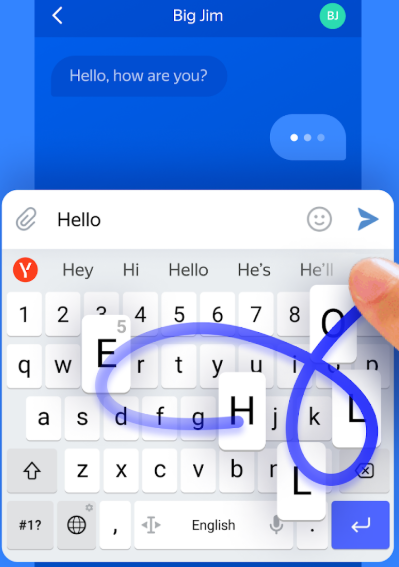
The keyboard also includes emojis, GIFs, and stickers that can be inserted directly into messages. These tools make it suitable for everyday conversations, social media interactions, and communication across different languages.
2. Key Features
- Smart Autocorrection: Detects common spelling and typing mistakes and suggests corrections as you write.
- Swipe Typing: Enter words by sliding your finger across the letters instead of tapping each key individually.
- Translation in 70 Languages: Translate text between supported languages directly from the keyboard without switching to a separate translation app.
- Voice Input: Convert spoken words into written text using the built-in voice recognition function.
- Emojis, GIFs, and Stickers: Browse and insert visual content while composing messages.
- Personalized Word Suggestions: Get word and phrase recommendations based on your typing patterns and frequently used expressions.
- Input Data Practices: Yandex provides information about keyboard data collection and processing in its official privacy policy.
3. How to Use Yandex Keyboard
After installing Yandex Keyboard, enable it in your device's keyboard settings and select it as the default input method. It will then appear when you enter text in messaging apps, social media platforms, search fields, and other applications.
You can type normally, use autocorrection, or slide your finger across the keys to form words. For multilingual conversations, open the translation tool and select the languages you need. Voice input is available when you prefer speaking to typing.
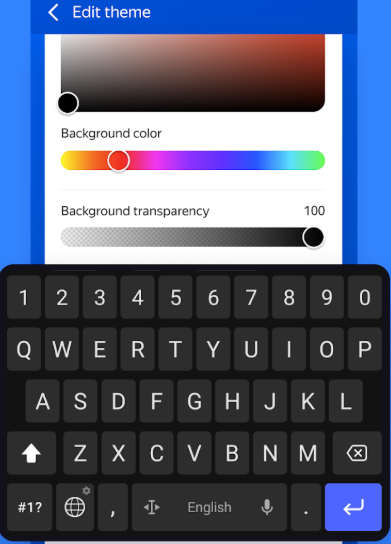
To insert visual content, open the emoji, GIF, or sticker panel from the keyboard. You can also adjust the keyboard's appearance and input settings through its configuration options.
4. Frequently Asked Questions
Q1. How many languages does Yandex Keyboard support for translation?
It supports translation across 70 languages.
Q2. Can I type by swiping across the keyboard?
Yes. Swipe typing allows you to form words by sliding your finger across the letters.
Q3. Does Yandex Keyboard support voice typing?
Yes. Its voice input function converts speech into written text.
Q4. Can I insert GIFs and stickers into messages?
Yes. Emojis, GIFs, and stickers are accessible directly from the keyboard.
Q5. Does Yandex Keyboard provide personalized word suggestions?
Yes. It recommends words and phrases based on your typing patterns and frequently used expressions.
Q6. Where can I find information about Yandex Keyboard's data collection practices?
Consult Yandex's official privacy policy for details about the information collected and how it is processed.
- Version106.8
- UpdateNov 23, 2026
- DeveloperDirect Cursus Computer Systems Trading LLC
- CategoryTools
- Requires AndroidAndroid 7.0+
- Downloads32M+
- Package Nameru.yandex.androidkeyboard
- Signaturedfb7e962a49318fe1568d4ec8be41b47
- Available on
- ReportFlag as inappropriate
-
NameSizeDownload
-
69.48 MB
-
69.38 MB
-
69.38 MB