World of Skins - Customizes game character
Explore thousands of unique skins for your Minecraft avatar

- 6.0.6 Version
- 4.7 Score
- 20M+ Downloads
- Free License
- 3+ Content Rating


1. App Overview
World of Skins is an Android app developed by Crone for browsing, creating, and applying custom character skins in Minecraft. Its Google Play description lists more than two million designs, covering themes such as anime characters, superheroes, animals, mobs, and characters from other games. Users can explore the collection through categories and keyword searches to find skins that match their preferred styles.
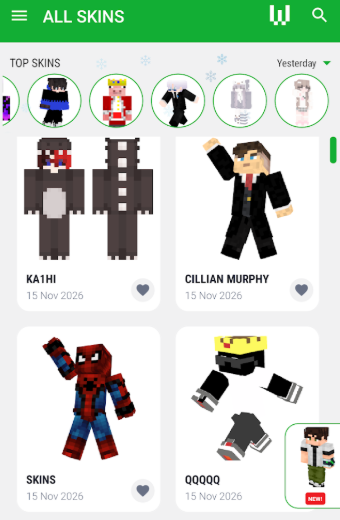
The app also includes a built-in Workshop for creating custom skins. Users can edit individual body parts, including the head, torso, arms, and legs, rather than relying solely on existing designs. Finished creations can be saved in HD or uploaded to the community for other users to discover.
Additional features include a 3D preview, popularity rankings, browsing history, and community reactions. Selected skins can be applied in Minecraft and other supported sandbox games. For more advanced editing, users can transfer their creations to Crone's separate skin editor.
2. Key Features
Large Skin Library: Browse more than two million designs featuring anime characters, superheroes, animals, mobs, and other themes.
Categories and Search: Explore organized collections or find specific designs using keywords.
3D Preview: Rotate and zoom in on character models to inspect skins from different angles.
Built-in Workshop: Customize the head, torso, arms, and legs individually.
HD Saving: Export completed skin designs in high definition.
Community Sharing: Upload original creations for other users to discover.
Community Reactions: Like published skins and respond using emoji reactions.
Popularity Rankings: Browse popular submissions based on community activity.
Browsing History: Return to previously viewed designs.
Game Integration: Apply selected skins in Minecraft and other supported sandbox games.
External Editor Support: Transfer creations to Crone's separate editor for additional customization.
3. How to Use World of Skins
Users can start by browsing the skin library, exploring categories, or searching for specific characters and themes. The 3D viewer provides a closer look at each design before it is selected for use in a compatible game.
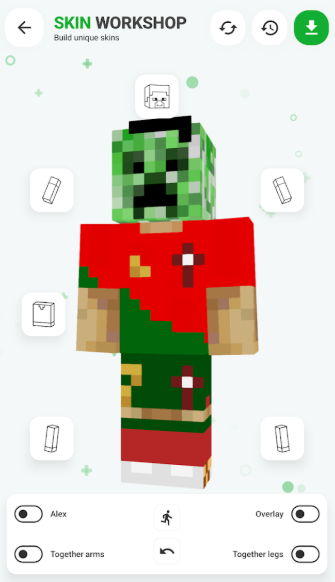
For custom designs, the Workshop provides individual editing controls for different character parts. Once a skin is finished, it can be saved in HD or shared with the community.
To use a downloaded skin in a game, users can select the available installation option and follow the instructions for their chosen game. Those who need more advanced editing tools can also transfer their projects to Crone's separate editor.
4. Frequently Asked Questions (FAQs)
Q1. Is World of Skins officially affiliated with Minecraft?
No. World of Skins is developed by Crone and is not officially affiliated with Mojang Studios or Microsoft.
Q2. Can I create my own Minecraft skins?
Yes. The built-in Workshop lets users customize individual body parts and save their finished designs in HD.
Q3. Can I preview skins before downloading them?
Yes. The 3D viewer supports rotation and zoom, allowing users to inspect a design before using it.
Q4. Can I share custom skins with other users?
Yes. Finished creations can be uploaded to the community, where other users can browse and react to them.
Q5. Do I need Crone's separate skin editor?
No. The built-in Workshop supports basic skin customization. The separate editor is optional and provides additional editing tools.
Q6. Is World of Skins free?
Yes. The Android app is free to download on Google Play and contains advertisements.
- Version6.0.6
- UpdateNov 23, 2026
- DeveloperCrone
- CategoryTools
- Requires AndroidAndroid 6+
- Downloads20M+
- Package Namecom.crone.worldofskins
- Signature3850b76485a8489e4d2a2fd6346ed43f
- Available on
- ReportFlag as inappropriate
-
NameSizeDownload
-
68.94 MB
-
34.46 MB
-
80.59 MB