Analog Clock Live Wallpaper-7 - Live clock wallpaper
Watch time pass in style with customizable analog clock live wallpapers.

- 6.63 Version
- 4.5 Score
- 18M+ Downloads
- Free License
- 3+ Content Rating


1. App Overview
Analog Clock Live Wallpaper-7 turns an Android screen into a customizable analog clock. It can be used as a live wallpaper, a home-screen widget, a floating clock overlay, a full-screen time display, or a screensaver while the device is charging. The clock combines traditional hands with optional digital time, date, weekday, month, and battery information, giving users several ways to keep track of time without opening a separate clock app.
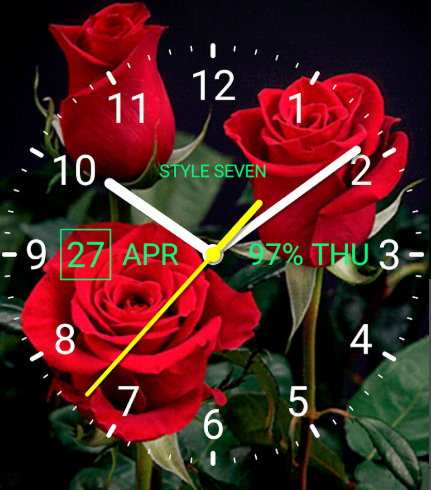
Its appearance is adjustable through solid or gradient color styles, custom primary and secondary colors, text colors, and personalized logo text. Users can also change the clock's size and position, with alignment controls available for the live wallpaper. For additional timekeeping support, the clock can announce the current time when double-tapped or speak scheduled reminders containing custom text.
The app also includes a Night Clock style with a dark background and gray hands, along with an option to change the clock's position periodically to help reduce screen burn-in. A more recent update adds readings from compatible device sensors, including ambient temperature, humidity, and barometric pressure. These measurements are displayed directly on the clock face and do not require an internet connection. With several display modes and configurable information, the app serves as both a decorative clock and a practical time display.
2. Key Features
Multiple Clock Display Modes: Use the clock as a live wallpaper, home-screen widget, floating overlay, full-screen clock, or charging screensaver.
Analog and Digital Time: Display traditional clock hands alongside an optional digital time readout.
Customizable Clock Appearance: Choose solid or gradient styles, adjust primary and secondary colors, customize text colors, and add personal logo text.
Additional Date and Battery Information: Show the current date, weekday, month, and battery charge. Battery information is not available in the app widget.
Voice Time Announcements: Double-tap the clock to hear the current time.
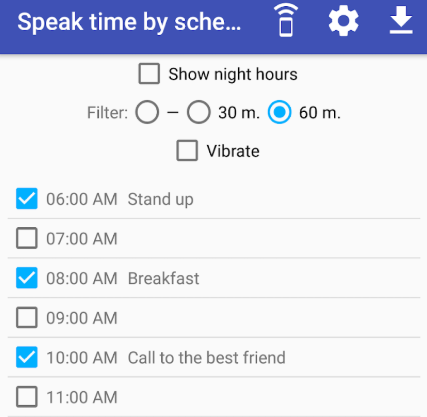
Scheduled Voice Reminders: Create a reminder list with scheduled time announcements and custom spoken text.
Night Clock Mode: Use a black background with dark-gray hands for a more subdued nighttime display.
Position Adjustment: Resize and reposition the clock. The floating overlay can be moved by dragging it across the screen.
Environmental Sensor Readings: Display temperature, humidity, and barometric pressure when the device has the required sensors.
Landscape and Portrait Support: Use the clock in different screen orientations and on a range of display resolutions.
3. Main Functions
Set a Live Wallpaper: Open the wallpaper settings, select Analog Clock Live Wallpaper-7, adjust the clock's size and position, and apply it to the screen.
Add a Home-Screen Widget: Place the analog clock on the home screen and resize it using the device's widget controls.
Display a Floating Clock: Enable the topmost or overlay mode, then drag the clock to a suitable position and adjust its size.
Open a Full-Screen Clock: Launch the clock in full-screen mode and keep the display on while viewing it.
Customize the Clock Face: Select a solid or gradient appearance, change its colors, and enter custom logo text.
Choose Display Information: Configure which time and date details appear on the clock, including the digital time, date, weekday, month, and battery charge where supported.
Set Up Voice Reminders: Add scheduled announcements with custom text so the clock can speak at selected times.
Use the Clock as a Screensaver: Set it as the screensaver displayed while the device is charging.
Enable Night Display: Switch to the dark clock style and use periodic position changes to reduce the risk of screen burn-in.
View Environmental Readings: Display available temperature, humidity, and air-pressure measurements from the device's internal sensors.
4. Frequently Asked Questions (FAQ)
Q1. Can I use Analog Clock Live Wallpaper-7 as a home-screen widget?
Yes. The app supports a home-screen clock widget. On Android 12 and later, the widget can display a second hand. Some information, such as battery charge, is not shown in widget mode.
Q2. Can the clock speak the current time?
Yes. Double-tap the clock to hear the current time. You can also create scheduled voice reminders containing the time and additional text.
Q3. Does the app support floating clock mode?
Yes. Its topmost or overlay mode keeps the clock visible above other windows. You can move it by dragging and adjust its size.
Q4. Can I use the app without an internet connection?
The clock's basic time display and its environmental readings from supported built-in sensors do not require an internet connection. The sensor readings depend on the hardware available on the device.
Q5. Why can't I see the second hand in the widget?
Widget behavior depends on the Android version. The app listing specifies second-hand support for widgets on Android 12 and later, so older versions may have different display limitations.
Q6. Does Analog Clock Live Wallpaper-7 contain ads?
Yes. Google Play identifies the app as containing ads.
- Version6.63
- UpdateNov 23, 2026
- DeveloperStyle-7
- CategoryTools
- Requires AndroidAndroid 5.0+
- Downloads18M+
- Package Namecom.style_7.analogclocklivewallpaper_7
- Signaturec392d4717e3e7f9fba4e97bf23885179
- Available on
- ReportFlag as inappropriate
-
NameSizeDownload
-
5.22 MB
-
5.70 MB
-
5.34 MB