
My Telenor - Phone plan assistance
Track data usage, pay bills, and manage mobile services easily.

- 4.2.58 Version
- 4.4 Score
- 38M+ Downloads
- Free License
- 3+ Content Rating


About My Telenor
My Telenor is a mobile account management app developed by Telenor Pakistan for its prepaid and postpaid subscribers. It combines mobile account controls, package subscriptions, payment services, rewards, and digital entertainment.
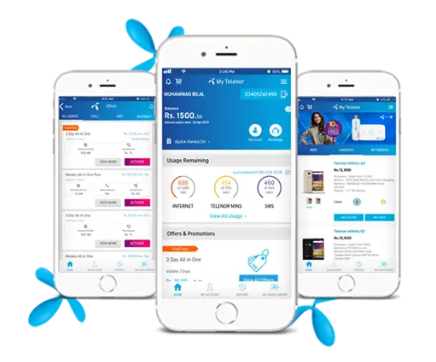
Subscribers can check their remaining internet data, call minutes, SMS allowances, and account balance. They can also activate mobile packages, access promotional deals, and use MY OFFER to customize packages according to their preferred data, call, and SMS allowances. Prepaid users can recharge their numbers, while postpaid subscribers can pay their bills through supported payment methods.
Beyond account services, the app includes daily quizzes, promotional rewards, games, and entertainment content such as music, movies, and live sports. Additional tools cover multiple-number management, complaint submissions, PIN and PUK retrieval, and mobile internet settings.
Key Features of My Telenor
Account Monitoring: Check account balance, remaining internet data, call minutes, SMS allowances, and billing details
Package Subscriptions: Browse and activate prepaid and postpaid packages, promotional offers, and app-exclusive Flash Sales
MY OFFER: Customize mobile packages by selecting preferred data, call, and SMS allowances
Social Media Bundles: Access dedicated data packages for WhatsApp, Instagram, Twitter, Snapchat, and TikTok
Recharge and Bill Payments: Top up prepaid accounts and pay postpaid bills using supported bank cards and mobile wallets
Netflix Payments: Access Netflix payment services through the app
Balance Loan: Request additional mobile credit when the account balance is insufficient
Daily Rewards: Take part in quizzes, check free internet MB promotions, and access Friday rewards
Entertainment: Play Ludo and explore music, movies, and live sports content
Complaint Management: Submit service complaints and track their progress
Multiple Number Management: Manage several Telenor connections through one account
Postpaid Conversion: Explore postpaid packages and request a change from prepaid to postpaid service
How to Use My Telenor
After installing the app, enter your Telenor mobile number and complete the on-screen verification process. Once logged in, the home screen displays your account information and provides access to the available services.
Check Mobile Usage
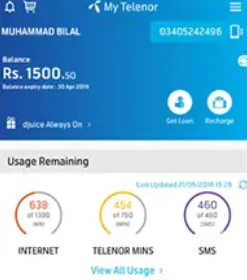
Open the account overview to see your current balance, remaining internet data, call minutes, and SMS allowances. Review these details before subscribing to a new package or purchasing additional credit.
Activate a Package
Go to the offers section and browse the available packages. Select one to review its allowances and conditions before activating it. If you prefer a customized combination of data, calls, and SMS, open MY OFFER and configure the available options.
Recharge or Pay a Bill
Enter the payment section and choose the relevant transaction type. Prepaid subscribers can recharge their numbers, while postpaid users can settle their bills using the supported payment options.
Access Rewards and Entertainment
Visit the rewards section to participate in daily quizzes and check available free MB promotions. Games and media content can be accessed through the entertainment services.
Manage Other Services
Use the account management options to add or access other Telenor connections. The support section provides complaint submission tools, while additional account services include PIN and PUK retrieval and mobile internet settings.
My Telenor App Experience
My Telenor combines routine mobile account operations with services that go beyond package management. Balance checks, usage monitoring, subscriptions, and payments form its core functions, while MY OFFER provides an additional way to select package allowances instead of relying only on predefined options.
The rewards and entertainment sections operate separately from the main account controls. Subscribers can participate in quizzes and check promotional MB offers without going through the package subscription process. Games and media content add a separate entertainment component to the app.
Multiple-number management is another notable feature, particularly for subscribers who oversee several Telenor connections. Instead of switching between separate applications, they can access multiple numbers through the same platform.
Overall, My Telenor covers the main requirements of managing a Telenor Pakistan mobile connection, with additional rewards, entertainment, and customer service tools included alongside account controls.
FAQs
1. Who can use My Telenor?
My Telenor is designed for Telenor Pakistan subscribers with prepaid or postpaid mobile connections.
2. Can I check my remaining internet data and call minutes?
Yes. The account overview displays your remaining data, call minutes, SMS allowances, and available balance.
3. How can I recharge my number or pay my postpaid bill?
Open the payment section and select the appropriate transaction. You can then choose from the supported payment methods, including eligible bank cards and mobile wallets.
4. How can I get free internet MBs?
Open the daily rewards section to check available quizzes, free MB promotions, and Friday rewards. Some offers may have specific eligibility requirements.
5. Can I manage multiple Telenor numbers in the app?
Yes. The multiple-number management feature allows you to access and manage additional Telenor connections through the same app.
6. Can I convert my prepaid connection to postpaid?
Yes. You can review available postpaid plans and use the in-app conversion option to submit a request to change your connection type.
- Version4.2.58
- UpdateNov 18, 2026
- DeveloperTelenor-Pakistan
- CategoryTools
- Requires AndroidAndroid 6+
- Downloads38M+
- Package Namecom.telenor.pakistan.mytelenor
- Signaturec5537bb45adde7796cec786a72e59364
- Available on
- ReportFlag as inappropriate
-
NameSizeDownload
-
32.88 MB
-
28.38 MB
-
28.37 MB








