
DuckDuckGo - Privacy-focused search engine
Privacy-focused search engine, no tracking or targeted ads, safe browsing experience.

- 5.254.0 Version
- 4.5 Score
- 43M+ Downloads
- In-app purchases License
- 3+ Content Rating


About DuckDuckGo
DuckDuckGo is a privacy-focused web browser for Android that combines web search with tools designed to limit online tracking. Its built-in search engine does not require an account, while tracker blocking prevents many third-party tracking requests from loading on websites.
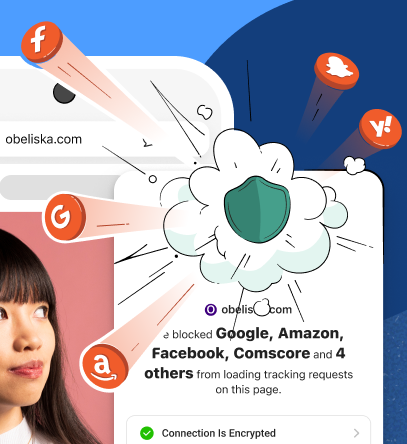
The browser includes automatic HTTPS upgrades, fingerprinting protection, and cookie pop-up management. Additional features include Email Protection, which removes many hidden trackers from incoming emails, and App Tracking Protection, which monitors tracking activity from other applications on Android devices.
DuckDuckGo also provides tools for managing browsing sessions and privacy settings. Its Fire Button closes open tabs and clears browsing data, while Global Privacy Control (GPC) sends participating websites a request not to sell or share personal information.
Key Features
Private Search: Search the web without creating an account or associating searches with a personal profile.
Tracker Blocking: Block many known third-party trackers on websites to reduce cross-site tracking.
Email Protection: Remove many hidden email trackers and create private forwarding addresses that protect a primary email address.
Automatic HTTPS: Upgrade supported website connections to encrypted HTTPS whenever possible.
Fingerprinting Protection: Limit the browser and device information websites can use to distinguish individual users.
App Tracking Protection: Monitor network activity from other Android apps and block many known third-party trackers, including background tracking requests.
Fire Button: Close all open tabs and erase browsing data with a single tap.
Cookie Pop-up Management: Automatically handle supported cookie consent requests according to selected privacy preferences.
Global Privacy Control (GPC): Send a signal to participating websites requesting that they not sell or share personal information.
How to Use DuckDuckGo
After installation, open DuckDuckGo to access its search and browsing functions.
Search the Web: Enter keywords or a website address in the search bar to find information or visit a specific website.
Adjust Privacy Settings: Open Settings to configure available browsing protections and cookie consent preferences.
Set Up Email Protection: Access Email Protection to create a private forwarding address and manage the feature.
Clear Browsing Data: Tap the Fire Button to close open tabs and erase browsing information.
Enable App Tracking Protection: Activate the feature in the app settings to monitor and block known trackers from other installed applications.
Privacy Pro Subscription
DuckDuckGo offers Privacy Pro as an optional paid subscription that adds services beyond its standard browser protections. Depending on regional availability, the subscription includes:
VPN: Encrypt internet traffic across up to five devices.
Personal Information Removal: Request the removal of personal information from supported data broker websites.
Identity Theft Restoration: Receive assistance with identity theft recovery if personal information is compromised.
Privacy Pro is not required for regular browsing. Private Search, website tracker blocking, and the browser's other core privacy features remain available for free.
FAQs
1. Can I use DuckDuckGo without creating an account?
Yes. Regular browsing does not require registration or sign-in. You can search the web and visit websites as soon as you open the app.
2. Does DuckDuckGo completely prevent online tracking?
No. Its privacy protections block many known trackers and limit certain tracking techniques, but they cannot prevent all forms of tracking or data collection.
3. What happens when I press the Fire Button?
The Fire Button closes open tabs and clears browsing data, including browsing history and other stored information covered by the selected clearing options.
4. Does App Tracking Protection work like a regular VPN?
No. It uses a local VPN connection on your Android device to filter network traffic and block known trackers from other apps. It does not provide conventional VPN functions such as changing your virtual location.
5. Is Privacy Pro required to use DuckDuckGo's privacy features?
No. Private Search, website tracker blocking, and other built-in browser protections are free. Privacy Pro is an optional subscription that adds services such as VPN access and personal information removal.
6. How do I make DuckDuckGo my default browser?
Open your Android device's Settings, go to Default Apps or Browser App, and select DuckDuckGo. The exact menu names may differ depending on your Android version and device manufacturer.
- Version5.254.0
- UpdateNov 17, 2026
- DeveloperDuckDuckGo
- CategoryTools
- Requires AndroidAndroid 8.0+
- Downloads43M+
- Package Namecom.duckduckgo.mobile.android
- Signature8cc10579ebd7638dd01e66b8d03aeeaf
- Available on
- ReportFlag as inappropriate
-
NameSizeDownload
-
112.33 MB
-
112.29 MB
-
112.18 MB









Rich feature set
Intuitive user interface
Excellent security
Sources search results from other search engines