
Mi Remote controller - for TV,
Turn your phone into a universal TV remote with ease.

- 7.2.1.1 Version
- 4.2 Score
- 91M+ Downloads
- Free License
- 3+ Content Rating


About Mi Remote Controller
Mi Remote Controller turns a compatible smartphone into a remote control for household electronics. It allows users to operate multiple appliances through one app, including TVs, air conditioners, set-top boxes, DVD players, projectors, A/V receivers, and cameras.
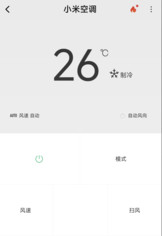
The app offers remote profiles for devices from manufacturers such as Samsung, LG, Sony, Panasonic, Sharp, Haier, Videocon, Micromax, and Onida. Actual compatibility depends on the appliance model, available remote profiles, and the smartphone's hardware.
Most appliances use infrared (IR) signals, requiring a built-in IR blaster on the phone. Compatible Mi TVs, Mi Boxes, and other supported smart TVs can also be controlled over Wi-Fi. The app additionally features a TV program guide with channel schedules and information about upcoming shows.
Key Features
Multiple Device Control: Store and switch between remote profiles for different household appliances
Infrared Remote Control: Operate compatible electronics using the phone's built-in IR blaster
Wi-Fi Remote Control: Control supported Mi TVs, Mi Boxes, and smart TVs over a wireless network
Multiple Brand Profiles: Choose from remote configurations for manufacturers such as Samsung, LG, Sony, Panasonic, Sharp, and Haier
TV Program Guide: Check channel schedules and information about upcoming programs
Home Screen Shortcuts: Add configured remotes to the home screen for direct access
Custom Remote Names: Assign individual names to remote profiles to identify different appliances
How to Use Mi Remote Controller
Open the app, select the option to add a device, and choose its category and manufacturer. Mi Remote Controller displays available remote profiles for the selected brand.
Test the suggested controls while pointing the phone toward the appliance. If the commands work correctly, confirm the profile. If not, try another available configuration until you find one that matches the device.
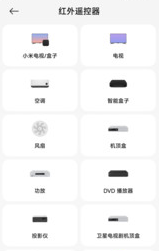
After setup, assign the remote a recognizable name. Repeat the process for other appliances and switch between their profiles whenever needed. Frequently used remotes can also be added to the home screen as shortcuts.
The connection method depends on the appliance. Traditional infrared control requires a built-in IR blaster and a direct line of sight, while supported smart TVs and Mi devices receive commands through Wi-Fi. An internet connection may be required during initial setup to retrieve remote profiles and access TV program information.
Frequently Asked Questions
1. Does Mi Remote Controller work on every Android phone?
No. Infrared control requires a built-in IR blaster. Phones without one can only use compatible Wi-Fi-connected devices, provided the app and target appliance support this connection method.
2. Can Mi Remote Controller operate air conditioners?
Yes. Select the Air Conditioner category, choose the manufacturer's brand, and test the available remote profiles. Compatibility varies depending on the air conditioner model and supported configurations.
3. Why isn't Mi Remote responding to my TV?
The phone may not have an IR blaster, or the selected remote profile may not match the TV. Check whether the TV supports Wi-Fi control or try another available infrared profile.
4. Does Mi Remote require an internet connection?
Internet access is not normally required for infrared operation once the remote has been configured. However, it may be needed to retrieve remote profiles during setup or access TV program information.
5. Can I configure remotes for multiple appliances?
Yes. The app allows users to create separate remote profiles for different appliances, assign custom names, and switch between them without repeating the initial setup.
6. Can Mi Remote control a Mi TV or Mi Box without an IR blaster?
Yes, if the smartphone, Mi TV, or Mi Box supports Wi-Fi remote control through the app. In this case, commands are transmitted over the wireless network instead of through infrared signals.
- Version7.2.1.1
- UpdateNov 18, 2026
- DeveloperBeijing Xiaomi Mobile Software Co.,Ltd
- CategoryTools
- Requires AndroidAndroid 5.1+
- Downloads91M+
- Package Namecom.duokan.phone.remotecontroller
- Signature2e508939b628ae2d69c18241e585b2a7
- Available on
- ReportFlag as inappropriate
-
NameSizeDownload
-
39.53 MB
-
39.53 MB
-
39.49 MB









works great with IR
Very flexible and universal
sometimes provide only basic features
some buttons missing