
Garmin Connect™ - Fitness tracking & analysis
Track workouts, set goals, and view progress with Garmin Connect™.
- 5.19 Version
- 4.2 Score
- 24M+ Downloads
- Free License
- 3+ Content Rating


1. App Overview
Garmin Connect is Garmin's companion app for compatible smartwatches, fitness trackers, and other Garmin devices. It collects workout records, activity statistics, and health measurements, allowing users to review their performance and track changes in their daily activity.
After pairing a compatible device, such as a Forerunner, Venu, or fēnix watch, with a phone, users can synchronize recorded data and review activities such as running, walking, cycling, and swimming. Each activity record may include distance, pace, duration, route information, and other performance statistics. Depending on the connected device, Garmin Connect can also display heart rate, blood oxygen levels, sleep, stress, and daily step counts.
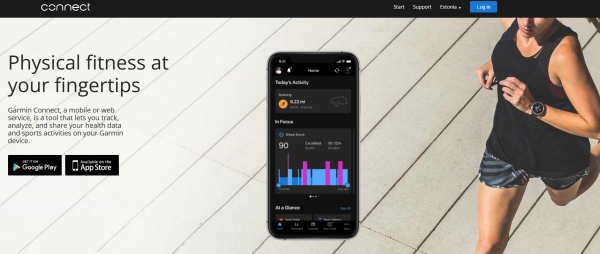
For training, the app includes tools for creating structured workouts, planning routes, and setting fitness goals. Users can also add friends, join individual or group challenges, compare activity records, and earn badges for completing milestones. The dashboard can be customized to display frequently used statistics and activity information.
Garmin Connect also integrates with third-party platforms such as Strava and MyFitnessPal, allowing compatible fitness data to be shared between services. It provides Garmin device owners with a central place to review training history, monitor activity trends, and manage their fitness routines.
2. Key Features
Garmin Device Synchronization: Pair compatible Garmin watches and fitness trackers to synchronize recorded activities and health measurements.
Workout Statistics: View distance, pace, duration, routes, and other performance data for individual activities.
Health Monitoring: Review available heart rate, blood oxygen, sleep, stress, and daily activity records.
Workout and Route Planning: Create structured training sessions and plan routes for supported outdoor activities.
Fitness Challenges and Badges: Join challenges, compare activity progress with friends, and earn badges for achievements.
Customizable Dashboard: Arrange homepage sections to prioritize frequently viewed statistics and activity records.
Third-Party Integrations: Connect services such as Strava and MyFitnessPal to share compatible fitness data.
3. Main Functions
Review Workout History
Users can browse synchronized activities and open individual records to check distance, pace, duration, routes, and other workout details. Comparing previous sessions helps identify changes in performance and training consistency.
Monitor Daily Activity and Health
Garmin Connect displays daily step counts and health measurements collected by compatible devices. Users can check recorded heart rate, sleep patterns, stress levels, and blood oxygen data when supported by their Garmin hardware.
Create Workouts and Plan Routes
Users can build structured workouts by choosing an activity and setting individual steps, distances, and durations. Route planning tools are also available for supported outdoor activities, helping users prepare courses before running, cycling, or other activities.
Join Challenges and Track Achievements
Users can add friends, view their activity records, and participate in individual or group fitness challenges. Completed activities and milestones may unlock badges, which are stored in the user's achievement history.
Manage Dashboard and Connected Accounts
The dashboard can be rearranged to prioritize selected statistics and activity information. Users can also manage linked third-party accounts and adjust data-sharing settings for compatible services.
4. FAQs
Q1: Is Garmin Connect free to use?
Yes. Garmin Connect is free to download and use with compatible Garmin devices. Available functions depend partly on the connected device and its capabilities.
Q2: Which devices are compatible with Garmin Connect?
The app supports various Garmin products, including Forerunner, Venu, and fēnix watches, as well as compatible fitness trackers and other Garmin devices. Compatibility varies by model.
Q3: Can I use Garmin Connect without a Garmin device?
You can install and open the app without pairing a Garmin device, but most core functions require data from compatible hardware. Without a connected device, you cannot synchronize Garmin-recorded activities or access device-dependent health measurements.
Q4: Can Garmin Connect track sleep and heart rate?
Yes. When paired with a compatible Garmin device, the app displays recorded heart rate, sleep, stress, and other health measurements. The available information varies by device model.
Q5: Does Garmin Connect sync with Strava?
Yes. Garmin Connect integrates with Strava and MyFitnessPal, among other third-party services. After linking the relevant accounts, compatible activity data can be shared between platforms.
Q6: Does Garmin Connect drain phone battery?
Battery consumption depends on synchronization frequency, background activity, notifications, and phone settings. GPS activity recording is generally handled by the connected Garmin device rather than continuously by the phone app. Background synchronization and connected features may still contribute to battery usage.
- Version5.19
- UpdateNov 24, 2026
- DeveloperGarmin
- CategoryHealth & Fitness
- Requires AndroidAndroid 9+
- Downloads24M+
- Package Namecom.garmin.android.apps.connectmobile
- Signature150bd2a9e0d5df94417179f2d6a92675
- Available on
- ReportFlag as inappropriate
-
NameSizeDownload
-
277.31 MB
-
264.12 MB
-
238.12 MB








The app is functional
connects some very powerful devices
the app is rather buggy