AccuBattery - Battery health monitor
Maximize battery health and lifespan, monitor usage, and prevent degradation easily

- 2.1.8 Version
- 4.5 Score
- 19M+ Downloads
- In-app purchases License
- 3+ Content Rating


1. App Overview
AccuBattery is an Android battery monitoring app that provides information about battery health, charging performance, and power consumption. It estimates the battery's current capacity in milliamp-hours (mAh) using data from the device's battery charge controller. By comparing this estimate with the battery's original design capacity, users can track capacity loss over time.
The app records battery wear during individual charging sessions, allowing users to review historical data and monitor battery degradation. It also includes a customizable charging alarm that sends a notification when the battery reaches a selected percentage.
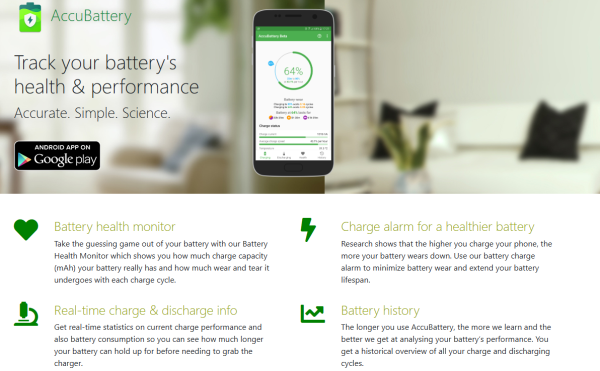
AccuBattery provides additional statistics on charging current, discharge rates, and estimated battery runtime. Users can check power consumption estimates for individual apps, compare screen-on and screen-off usage, and review deep sleep statistics to investigate standby battery drain.
AccuBattery is available as a free app with an optional Pro upgrade. The paid version removes advertisements and unlocks extended charging history, additional notification statistics, and dark and AMOLED black themes.
2. Key Features
Battery Health Estimates: Estimates current battery capacity in mAh and tracks capacity loss across charging sessions.
Charging Alarms: Sends notifications when the battery reaches a user-defined charge level.
Charging Performance Monitoring: Measures charging current and records charging speeds with different chargers and USB cables.
App Power Consumption: Estimates how much battery individual applications consume.
Battery Runtime Estimates: Calculates remaining battery life under active-use and standby conditions.
Deep Sleep Monitoring: Tracks deep sleep duration and device wake-up activity to help investigate standby drain.
Battery Notifications: Displays selected battery statistics through persistent notifications.
3. Main Functions
Check Battery Health: View estimated battery capacity and compare it with the manufacturer's original capacity rating.
Review Charging Sessions: Examine charging history, including charging speed and estimated battery wear.
Find High-Consumption Apps: Check application-level power estimates to identify apps that contribute more to battery drain.
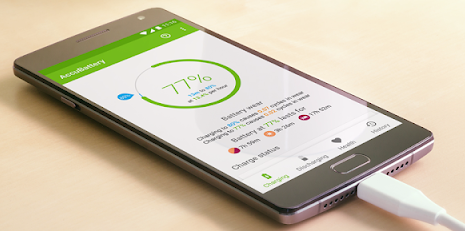
Estimate Remaining Runtime: Check how long the battery is expected to last during active use or standby.
Compare Charging Accessories: Measure charging current with different chargers and USB cables.
Investigate Standby Drain: Review deep sleep percentages and wake-up activity to understand overnight battery consumption.
4. Pro Features
AccuBattery Pro includes additional features for users who want more detailed battery records and customization options:
Extended Charging History: Access charging records beyond the one-day history limit of the free version.
Additional Notification Statistics: View more battery information through notifications.
Dark and AMOLED Black Themes: Choose between two dark interface styles.
Ad-Free Experience: Remove advertisements from the app.
The developer also provides a research and methodology guide explaining how AccuBattery estimates battery capacity, charging speed, and battery wear.
5. FAQs
Q1: What is AccuBattery used for?
AccuBattery monitors battery health, charging performance, and power consumption. It estimates battery capacity, records charging sessions, and provides statistics on app usage and battery runtime.
Q2: Does AccuBattery measure actual battery capacity?
No. AccuBattery estimates battery capacity in mAh using information from the battery charge controller and measurements collected during charging sessions. The result is an estimate rather than a direct laboratory measurement.
Q3: Can AccuBattery extend my phone's battery lifespan?
AccuBattery cannot restore lost battery capacity or prevent natural battery aging. However, its charging alarms and battery wear records help users monitor battery condition and adjust their charging habits.
Q4: How does AccuBattery identify apps that consume more power?
AccuBattery estimates individual app power consumption by combining battery controller measurements with information about foreground app activity. These estimates help users identify applications that may contribute significantly to battery drain.
Q5: What does AccuBattery Pro include?
AccuBattery Pro unlocks extended charging history, additional notification statistics, dark and AMOLED black themes, and an ad-free interface.
Q6: Where can I find AccuBattery tutorials and support?
Users can visit the official help center for setup instructions, tutorials, and troubleshooting guides. The developer's support portal also allows users to submit questions and support requests.
- Version2.1.8
- UpdateNov 24, 2026
- DeveloperDigibites
- CategoryTools
- Requires AndroidAndroid 7.0+
- Downloads19M+
- Package Namecom.digibites.accubattery
- Signature38c471a05b14978185d511a56869df49
- Available on
- ReportFlag as inappropriate
-
NameSizeDownload
-
19.56 MB
-
20.46 MB
-
16.07 MB