
Singapore Train Map (Offline) - Offline MRT & LRT maps
Explore Singapore effortlessly with the ultimate offline MRT & LRT map, perfect for locals & tourists alike.
- 1.0.126 Version
- 1.7 Score
- 318K+ Downloads
- Free License
- 3+ Content Rating




About Singapore Train Map (Offline)
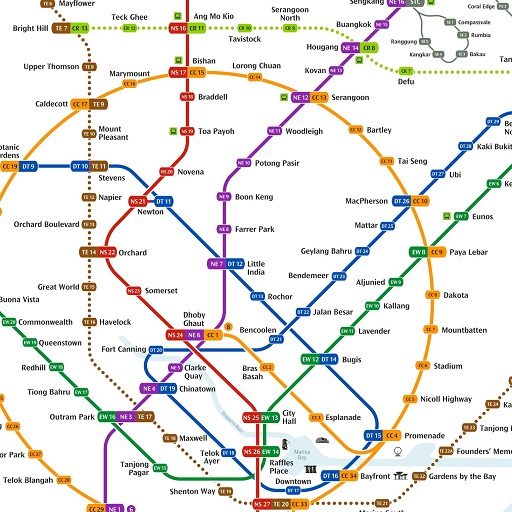
Singapore Train Map (Offline) is a public transport reference app featuring offline maps of Singapore’s Mass Rapid Transit (MRT) and Light Rail Transit (LRT) networks. It shows train lines, station locations, and route connections, helping residents and visitors understand the rail network and identify transfer points.
The maps are based on information from Singapore’s Land Transport Authority (LTA), SMRT, and SBS. They are stored locally on the device, allowing users to browse the network without Wi-Fi or mobile data. This is useful for international visitors without a local SIM card and travelers looking to reduce data usage. The interface supports English, Chinese, Malay, and Tamil.
Users can zoom in to read station names and examine route connections or switch to landscape orientation for a wider view of the network. The app is free to use and supported by advertisements. It is an independent transit reference tool, not officially affiliated with LTA, SMRT, or SBS.
Key Features of Singapore Train Map (Offline)
Offline Maps: Browse Singapore’s MRT and LRT networks without an internet connection.
High-Resolution Maps: View train lines, station names, and route connections in detail.
Four Interface Languages: Choose English, Chinese, Malay, or Tamil.
Deep Zoom: Magnify map sections to read station labels and identify interchange points.
Landscape View: Rotate the device to see a wider section of the rail network.
MRT and LRT Coverage: Access maps of both major rail transit systems in Singapore.
Free Access: Download and use the maps without a purchase fee. Advertisements support the app.
How to Use Singapore Train Map (Offline)
Open the app and select the MRT or LRT map. Browse the network to find stations, follow train lines, and check connections between routes when planning a journey.
Zoom in to read station names and examine interchange points. For a broader view, rotate your device into landscape orientation.
The maps remain accessible without an internet connection, but the app does not provide live train arrival times, operating hours, or service disruption updates. Check official transport sources for real-time travel information.
FAQs
1. Can I use Singapore Train Map (Offline) without an internet connection?
Yes. The maps are stored on your device and can be viewed without Wi-Fi or mobile data.
2. Does the app cover both MRT and LRT networks?
Yes. It includes maps of Singapore’s Mass Rapid Transit (MRT) and Light Rail Transit (LRT) systems.
3. Which languages does the app support?
The interface is available in English, Chinese, Malay, and Tamil.
4. Can I zoom in to read station names?
Yes. The deep-zoom function lets you enlarge map sections to examine station labels and route connections.
5. Is Singapore Train Map (Offline) free?
Yes. The app is free to download and use, with advertisements supporting its operation.
6. Is the app officially affiliated with Singapore’s transport authorities?
No. It is an independent reference app. Its maps are based on information from LTA, SMRT, and SBS, but it is not officially affiliated with these organizations.
- Version1.0.126
- UpdateNov 20, 2026
- DeveloperDxG Solutions
- CategoryMaps & Navigation
- Requires AndroidAndroid 4.4+
- Downloads318K+
- Package Namecom.dxg.singaporemrtmapdetail
- Signature953efb7dfa3a3f19f22047a67389abc4
- Available on
- ReportFlag as inappropriate
-
NameSizeDownload
-
35.43 MB
-
35.50 MB
-
35.65 MB














Comprehensive train line coverage with station details
User-friendly offline MRT map
Categorized maps for easy navigation
Fast and responsive functionality
Clean and simple interface
Regular updates for performance improvements
Multilingual support catering to Singapore's diversity
Non-intrusive ads
Map resets to default zoom when switching apps
Missing route recommendation feature
Incomplete updates for new stations
Multiple versions available in the Play Store causing confusion
Ad pop-ups (e.g. Lazada) while using the map
Lack of customization options for start page
Some station information is outdated or missing
Static maps may limit interactive experience