
Panasonic LUMIX Sync - Camera control & image transfer
Unlock your camera's potential! Effortlessly control shoots & transfer images straight to your phone with ease.

- 2.0.16 Version
- 1.0 Score
- 293K+ Downloads
- Free License
- 3+ Content Rating


About Panasonic LUMIX Sync
Panasonic LUMIX Sync is a mobile companion app for connecting compatible LUMIX digital cameras to Android smartphones via Wi-Fi and Bluetooth. It supports remote camera operation, wireless photo and video transfers, and GPS-based location tagging.
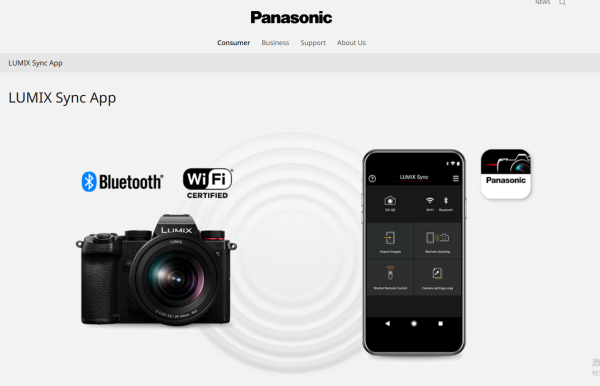
Compatible models include selected cameras from the LUMIX S and G series, such as the DC-S1, S1R, S5, S5II, S5IIX, S9, GH6, GH7, and G9II. The DC-GH5, GH5S, and G9 also support remote shooting and image transfers. Available functions vary by camera model, and some older models may require Panasonic Image App for certain operations.
The app supports Android 10 through Android 15. Its built-in user guide covers camera registration, wireless connections, and the main operating functions.
Key Features
Wireless Photo and Video Transfer: Transfer supported media from a compatible LUMIX camera to an Android smartphone without a cable.
Remote Shooting: View the camera's live image on your phone and release the shutter remotely.
Bluetooth Pairing: Register compatible cameras and follow the in-app instructions to establish a connection.
GPS Location Tagging: Use smartphone location data to add geographical information to captured images.
Wi-Fi Connectivity: Establish wireless connections for remote camera operation and media transfers.
802.11ac Support: Use compatible Wi-Fi routers to improve transfer speeds when the smartphone and router support 802.11ac.
Integrated User Guide: Find instructions for camera registration, connection settings, and supported functions.
How to Use Panasonic LUMIX Sync
Register a compatible LUMIX camera by following the pairing instructions in the app. Once connected, open the remote shooting interface to view the camera's live feed and take pictures using your smartphone.
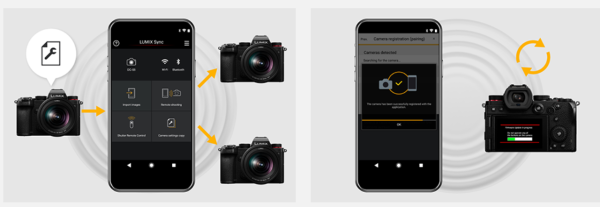
To transfer media, browse the supported photos and videos stored on the camera and select the files you want to copy to your phone. For GPS tagging, enable location information and grant the app permission to access your smartphone's location data.
For faster wireless transfers, an 802.11ac-compatible router may help if the smartphone also supports this standard. Keeping GPS location access active can increase battery consumption.
FAQs
1. Which Panasonic cameras are compatible with LUMIX Sync?
LUMIX Sync supports selected S and G series cameras, including the DC-S1, S1R, S5, S5II, S5IIX, S9, GH6, GH7, and G9II. The DC-GH5, GH5S, and G9 also support remote shooting and image transfers. Available functions depend on the camera model.
2. Which Android versions does LUMIX Sync support?
The app supports Android 10 through Android 15.
3. Can I control my camera remotely?
Yes. The remote shooting interface displays the camera's live image and lets you release the shutter from your smartphone.
4. Can I transfer videos to my phone?
Yes. Compatible cameras support wireless transfers of supported photos and videos.
5. Does LUMIX Sync support GPS location tagging?
Yes. The app uses your smartphone's GPS data to add geographical information to captured images. Continuous location access may increase battery consumption.
6. Do I need a Wi-Fi router to connect my camera?
No. Compatible cameras can connect directly to smartphones through Wi-Fi, with Bluetooth-assisted pairing available for supported models. An 802.11ac-compatible router may improve transfer speeds when both the router and smartphone support the standard.
- Version2.0.16
- UpdateNov 20, 2026
- DeveloperPanasonic Holdings Corporation
- CategoryPhotography
- Requires AndroidAndroid 10+
- Downloads293K+
- Package Namecom.panasonic.jp.lumixsync
- Signaturea3a46716373c0da891319bb2d793b9bf
- Available on
- ReportFlag as inappropriate
-
NameSizeDownload
-
50.41 MB
-
49.69 MB
-
47.50 MB









Improved user experience
Remote camera control feature
Fast USB-C connection option
Ability to transfer RAW files
Notifications for firmware updates
Useful for solo photography projects
Simplifies wireless camera operation
Access to camera settings through phone
Convenient photo sharing capabilities
Frequent connection issues
Complicated setup process
Unreliable app functionality
Annoying persistent notifications
Limited video transfer capability
Confusing Bluetooth and Wi-Fi integration
Poorly designed user interface
Slow connection times
Lack of professional features like waveform and vectorscope